STRUCTURE OF 8051
8051 STRUCTURE
Today we are going to learn about Intel 8051 structure

STRUCTURE OF 8051
Why USING 8051MCU?
Intel MCS-51

The Intel MCS-51 (commonly termed 8051) is a single chip microcontroller (MCU) series developed by Intel in 1980 for use in embedded systems. The architect of the Intel MCS-51 instruction set was John H. Wharton. Intel's original versions were popular in the 80s and early 90s and enhanced binary compatible derivatives remain popular today. It is an example of a complex instruction set computer, and has separate memory spaces for program instructions and data.
Intel's original MCS-51 family was developed using N-type metal-oxide-semiconductor (NMOS) technology like its predecessor Intel MCS-48, but later versions, identified by a letter C in their name (e.g., 80C51) use complementary metal–oxide–semiconductor (CMOS) technology and consume less power than their NMOS predecessors. This made them more suitable for battery-powered devices.STRUCTURE OF 8051
The family was continued in 1996 with the enhanced 8-bit MCS-151 and the 8/16/32-bit MCS-251 family of binary compatible microcontrollers. While Intel no longer manufactures the MCS-51, MCS-151 and MCS-251 family, enhanced binary compatible derivatives made by numerous vendors remain popular today. Some derivatives integrate a digital signal processor (DSP). Beyond these physical devices, several companies also offer MCS-51 derivatives as IP cores for use in field-programmable gate array (FPGA) or application-specific integrated circuit (ASIC) designs.
What makes this microcontroller so special and universal so that almost all manufacturers all over the world manufacture it today under different name?
 Pin Description :
Pins 1-8: Port 1 Each of these pins can be configured as an input or an output.
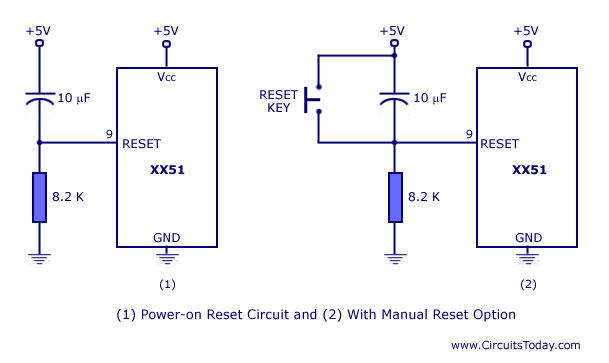
Pin 9: RS A logic one on this pin disables the microcontroller and clears the contents of most registers. In other words, the positive voltage on this pin resets the microcontroller. By applying logic zero to this pin, the program starts execution from the beginning.
Pins10-17: Port 3 Similar to port 1, each of these pins can serve as general input or output. Besides, all of them have alternative functions:
Pin 10: RXD Serial asynchronous communication input or Serial synchronous communication output.
Pin 11: TXD Serial asynchronous communication output or Serial synchronous communication clock output.
Pin 12: INT0 Interrupt 0 input.
Pin 13: INT1 Interrupt 1 input.
Pin 14: T0 Counter 0 clock input.
Pin 15: T1 Counter 1 clock input.
Pin 16: WR Write to external (additional) RAM.
Pin 17: RD Read from external RAM.
Pin 18, 19: X2, X1 Internal oscillator input and output. A quartz crystal which specifies operating frequency is usually connected to these pins. Instead of it, miniature ceramics resonators can also be used for frequency stability. Later versions of microcontrollers operate at a frequency of 0 Hz up to over 50 Hz.
Pin 20: GND Ground.
Pin 21-28: Port 2 If there is no intention to use external memory then these port pins are configured as general inputs/outputs. In case external memory is used, the higher address byte, i.e. addresses A8-A15 will appear on this port. Even though memory with capacity of 64Kb is not used, which means that not all eight port bits are used for its addressing, the rest of them are not available as inputs/outputs.
Pin 29: PSEN If external ROM is used for storing program then a logic zero (0) appears on it every time the microcontroller reads a byte from memory.
Pin 30: ALE Prior to reading from external memory, the microcontroller puts the lower address byte (A0-A7) on P0 and activates the ALE output. After receiving signal from the ALE pin, the external register (usually 74HCT373 or 74HCT375 add-on chip) memorizes the state of P0 and uses it as a memory chip address. Immediately after that, the ALU pin is returned its previous logic state and P0 is now used as a Data Bus. As seen, port data multiplexing is performed by means of only one additional (and cheap) integrated circuit. In other words, this port is used for both data and address transmission.
Pin 31: EA By applying logic zero to this pin, P2 and P3 are used for data and address transmission with no regard to whether there is internal memory or not. It means that even there is a program written to the microcontroller, it will not be executed. Instead, the program written to external ROM will be executed. By applying logic one to the EA pin, the microcontroller will use both memories, first internal then external (if exists).
Pin 32-39: Port 0 Similar to P2, if external memory is not used, these pins can be used as general inputs/outputs. Otherwise, P0 is configured as address output (A0-A7) when the ALE pin is driven high (1) or as data output (Data Bus) when the ALE pin is driven low (0).
Pin 40: VCC +5V power supply.


Memory Organization:
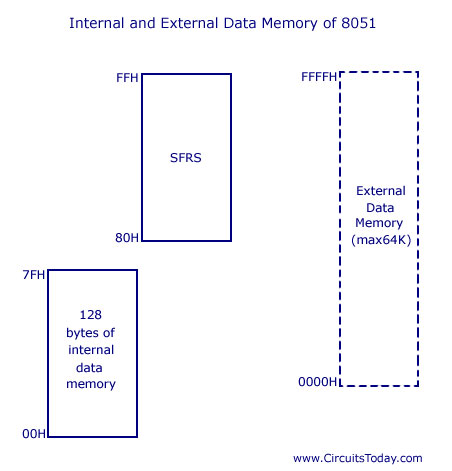
In the MCS-51 family, 8051 has 128 bytes of internal data memory and it allows interfacing external data memory of maximum size up to 64K. So the total size of data memory in 8051 can be upto 64K (external) + 128 bytes (internal). Observe the diagram carefully to get more understanding. So there are 3 separations/divisions of the data memory:- 1) Register banks 2) Bit addressable area 3) Scratch pad area.
.
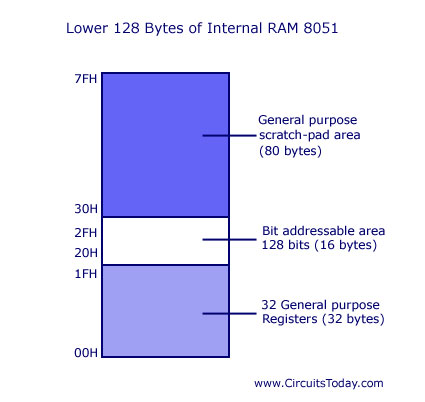
Register banks form the lowest 32 bytes on internal memory and there are 4 register banks designated bank #0,#1, #2 and #3. Each bank has 8 registers which are designated as R0,R1…R7. At a time only one register bank is selected for operations and the registers inside the selected bank are accessed using mnemonics R0..R1.. etc. Other registers can be accessed simultaneously only by direct addressing. Registers are used to store data or operands during executions. By default register bank #0 is selected (after a system reset).
The bit addressable ares of 8051 is usually used to store bit variables. The bit addressable area is formed by the 16 bytes next to register banks. They are designated from address 20H to 2FH (total 128 bits). Each bits can be accessed from 00H to 7FH within this 128 bits from 20H to 2FH. Bit addressable area is mainly used to store bit variables from application program, like status of an output device like LED or Motor (ON/OFF) etc. We need only a bit to store this status and using a complete byte addressable area for storing this is really bad programming practice, since it results in wastage of memory.
The scratch pad area is the upper 80 bytes which is used for general purpose storage. Scratch pad area is from 30H to 7FH and this includes stack too.
8051 System Clock:
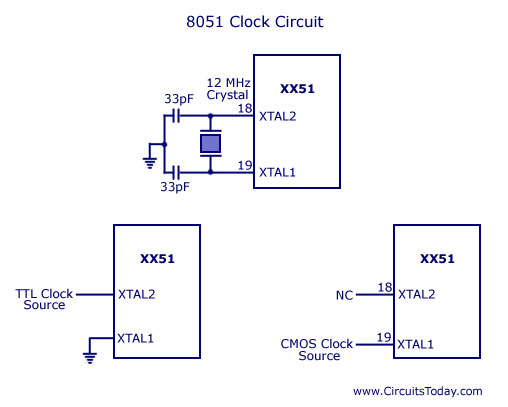
An 8051 clock circuit is shown above. In general cases, a quartz crystal is used to make the clock circuit. The connection is shown in figure (a) and note the connections to XTAL 1 and XTAL 2. In some cases external clock sources are used and you can see the various connections above. Clock frequency limits (maximum and minimum) may change from device to device. Standard practice is to use 12MHz frequency. If serial communications are involved then its best to use 11.0592 MHz frequency.
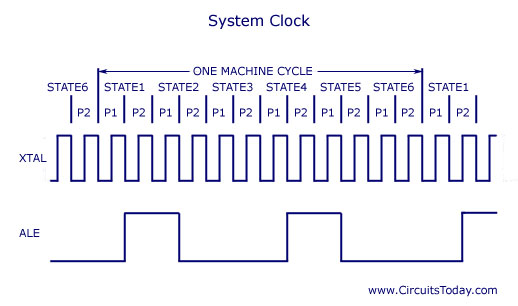
Okay, take a look at the above machine cycle waveform. One complete oscillation of the clock source is called a pulse. Two pulses forms a state and six states forms one machine cycle. Also note that, two pulses of ALE are available for 1 machine cycle.
IO Ports:
All 8051 microcontrollers have 4 I/O ports each comprising 8 bits which can be configured as inputs or outputs. Accordingly, in total of 32 input/output pins enabling the microcontroller to be connected to peripheral devices are available for use.
Pin configuration, i.e. whether it is to be configured as an input (1) or an output (0), depends on its logic state. In order to configure a microcontroller pin as an input, it is necessary to apply a logic zero (0) to appropriate I/O port bit. In this case, voltage level on appropriate pin will be 0.
Similarly, in order to configure a microcontroller pin as an input, it is necessary to apply a logic one (1) to appropriate port. In this case, voltage level on appropriate pin will be 5V (as is the case with any TTL input). This may seem confusing but don’t loose your patience. It all becomes clear after studying simple electronic circuits connected to an I/O pin.

8051 Reset Circuit
8051 can be reset in two ways 1) is power-on reset – which resets the 8051 when power is turned ON and 2) manual reset – in which a reset happens only when a push button is pressed manually. Two different reset circuits are shown above. A reset doesn’t affect contents of internal RAM. For reset to happen, the reset input pin (pin 9) must be active high for atleast 2 machine cycles. During a reset operation :- Program counter is cleared and it starts from 00H, register bank #0 is selected as default, Stack pointer is initialized to 07H, all ports are written with FFH.